
Codecademy is an online learning platform focused on interactive programming education. Instead of long video lectures or endless reading, you learn by actually writing code in your browser. Every lesson gives you an explanation, an example, and a small challenge to complete using real code.
The platform launched in 2011 and quickly became one of the most popular ways for beginners to learn to code. Over the years, it has expanded far beyond simple HTML tutorials to include entire career paths, data science programs, interview prep, and even certifications.
The philosophy behind Codecademy is simple: the best way to learn to code is to write code. This practical, hands-on model has helped millions of users start from scratch, build confidence, and even change careers.
Codecademy’s lessons run entirely in your browser, which means you don’t have to install software or set up your development environment. That convenience makes it ideal for beginners who might otherwise feel intimidated by the technical setup.
Is Codecademy Right for You?
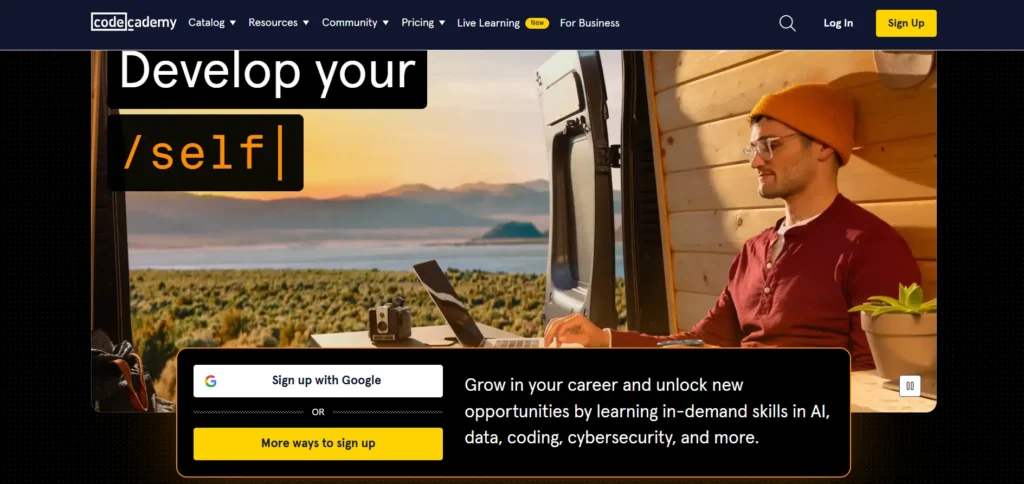
Codecademy can be an excellent resource—but it’s not for everyone. Let’s break down who it’s best for and who might want to look elsewhere.
Great for:
- Complete beginners. If you’ve never written a line of code, Codecademy makes starting painless. You’ll get comfortable with coding syntax without worrying about setup or configuration.
- People who learn by doing. Codecademy is built around interactivity. You’ll be typing and testing code constantly, not just watching someone else do it.
- Casual or hobby learners. It’s a good fit if you want to learn coding at your own pace, whether for personal projects or curiosity.
- Self-paced learners. You can move through lessons as fast or slow as you like, revisiting concepts when needed.
- Anyone exploring a career in tech. If you’re not sure coding is for you, Codecademy is an inexpensive way to test the waters.
Not ideal for:
- People seeking deep computer science theory. Codecademy focuses more on applied learning than on theory or math-heavy computer science.
- Learners who prefer video or instructor-led content. The platform is text-based, so if you prefer lectures, it might feel too minimal.
- Advanced coders. Intermediate or advanced programmers might find the lessons too basic.
- Anyone needing accredited credentials. Codecademy certificates are great for portfolios but are not formally recognized by universities or employers.
In short: Codecademy is perfect for beginners and motivated self-learners. It’s not a replacement for a formal degree or an advanced bootcamp, but it’s a fantastic starting point.
Features of Codecademy
Let’s take a closer look at what makes Codecademy tick.
1. Interactive Learning
The platform’s biggest strength is its interactivity. Instead of passively watching a video, you type code directly into an online editor. You see your results immediately, whether it’s printing text, styling a webpage, or manipulating data.
This instant feedback loop keeps you engaged and helps you learn from mistakes. It’s especially effective for people who learn best through hands-on experimentation rather than theory.
2. Hands-on Coding Environment
All coding happens right in your browser. You don’t have to download or install anything. For beginners, this is a lifesaver—no need to worry about setting up compilers or development tools.
As you progress, some advanced courses encourage you to install local tools, but by then you’ll already understand the basics, so it won’t feel overwhelming.
3. Structured Learning Paths
Codecademy organizes its lessons into Skill Paths and Career Paths.
- Skill Paths focus on specific skills, such as learning Python or mastering SQL.
- Career Paths are longer programs that guide you through everything needed to pursue a role like Front-End Developer, Data Scientist, or Full-Stack Engineer.
These paths give you a clear sense of direction and progression, so you don’t have to figure out what to learn next.
4. Real-World Projects (Pro Feature)
Once you upgrade to a paid plan, you gain access to projects that let you apply your skills to real scenarios. For example, you might build a simple website, an app, or a data visualization.
These projects help bridge the gap between learning and doing. They’re also great for building a small portfolio to show potential employers or clients.
5. Career Support (Pro Feature)
Codecademy’s Pro plan adds features aimed at career development. You get access to coding interview prep, portfolio-building exercises, and career quizzes.
Some courses also include resume guidance and mock interview practice. While it’s not as in-depth as a full bootcamp, it’s a nice boost for learners preparing to enter the job market.
6. Community Engagement
Codecademy has an active community where learners ask questions, share code, and discuss problems. There are discussion forums, study groups, and peer feedback sections.
It’s not as personalized as having a mentor, but it can still be helpful when you’re stuck on a tricky problem or need encouragement.
7. Certifications (Pro Feature)
When you finish a course or a Career Path under a Pro plan, you receive a certificate of completion. These certificates show commitment and learning progress, and they can be included in your resume or LinkedIn profile.
Keep in mind, however, that these are not accredited certifications. They’re great for showing initiative but won’t carry the same weight as formal credentials.
Courses Offered by Codecademy
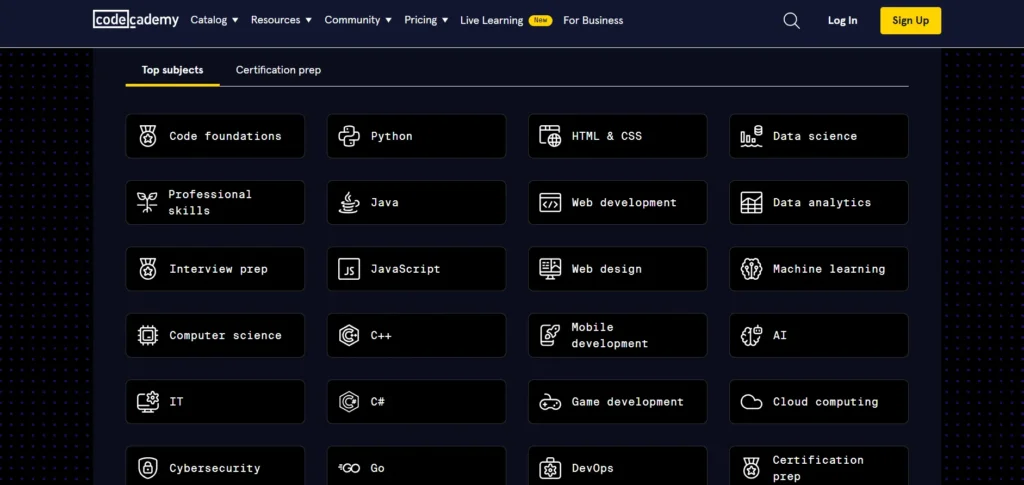
Codecademy offers a wide variety of courses, grouped into several categories.
1. Programming Languages
You can learn popular languages like Python, JavaScript, Java, Ruby, C++, C#, Swift, Go, PHP, and SQL. Each language track includes basics like syntax, loops, and conditionals, along with hands-on exercises.
2. Web Development
This is one of Codecademy’s strongest areas. It includes courses on HTML, CSS, JavaScript, React, Node.js, and frameworks for front-end and back-end development. Full-Stack Engineer and Front-End Developer paths are among the most popular.
3. Data Science
Data Science paths include Python for data, SQL, data visualization, machine learning basics, and working with libraries like pandas and NumPy. It’s a solid starting point for aspiring analysts or data scientists.
4. Computer Science
There are also beginner-level computer science courses that cover topics like data structures, algorithms, and problem-solving. These aren’t as deep as a university course, but they provide a helpful foundation.
5. Career-Oriented Skills
Beyond coding, Codecademy also offers lessons in:
- Git and version control
- Command line basics
- Debugging and software development workflows
- Coding interview prep
These extra skills are practical and directly relevant to real-world work.
Codecademy Pricing Plans
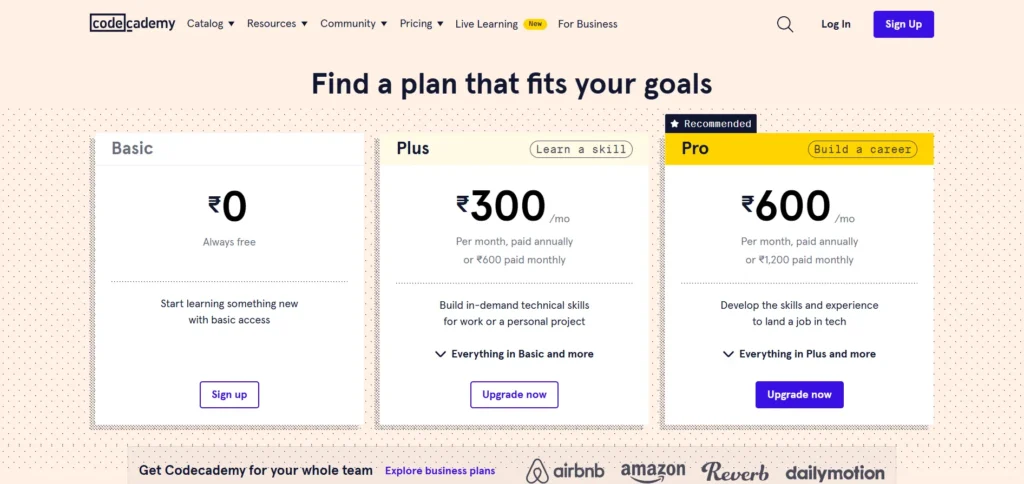
Codecademy offers multiple pricing tiers, so you can choose how much you want to spend depending on your goals.
1. Basic Plan – Free
The free plan gives you access to introductory lessons in several languages. You can explore basic syntax, logic, and simple projects. It’s great for testing whether you enjoy coding.
However, the free content is limited. You won’t get access to advanced lessons, projects, quizzes, or career paths.
2. Plus Plan – $14.99/month (annual) or $29.99/month (monthly)
The Plus plan gives access to more courses and practice content but doesn’t include everything. It’s good for learners who want structured progress without the career extras.
3. Pro Plan – $19.99/month (annual) or $39.99/month (monthly)
The Pro plan unlocks the full experience:
- Access to all courses and paths
- Real-world projects and assessments
- Certificates of completion
- Interview prep and career content
- Progress tracking and quizzes
This plan is best suited for learners who are serious about developing job-ready skills or switching careers.
4. Pro Student Plan – Over 35% off regular pricing
Students can get a significant discount on the Pro plan, usually more than 35% off. That makes it one of the most affordable ways for students to learn coding comprehensively.
Summary Comparison Table
| Feature | Basic (Free) | Plus | Pro |
|---|---|---|---|
| Introductory courses | ✔ | ✔ | ✔ |
| Full catalog access | ✘ | ✔ | ✔ |
| Practice tools & quizzes | ✘ | ✔ | ✔ |
| Real-world projects | ✘ | ✘ | ✔ |
| Career paths | ✘ | ✘ | ✔ |
| Interview prep | ✘ | ✘ | ✔ |
| Certificates | ✘ | ✘ | ✔ |
| Price (billed annually) | $0 | $14.99/mo | $19.99/mo |
| Student discount | — | — | 35%+ off |
Pros of Codecademy
1. Hands-On Learning:
Codecademy’s interactive approach makes learning to code engaging and effective. You write and test code as you go, which helps you understand concepts faster and remember them longer compared to simply watching tutorials.
2. Structured Learning Paths:
Each course and path is organized in a clear, logical order, guiding you step-by-step from beginner to intermediate levels. This structure is especially helpful for newcomers who aren’t sure where to begin.
3. Real-World Projects:
Pro subscribers can work on real-world projects that mirror professional coding tasks. These projects not only reinforce your learning but also give you practical examples to include in your portfolio.
4. Career Support:
The Pro plan includes career-focused tools like resume feedback, LinkedIn optimization tips, and mock interview practice. These resources are designed to help you transition from learning to landing a job in tech.
5. Community Support:
Codecademy has an active and supportive community of learners. You can ask questions, get feedback, and share experiences with others who are on a similar journey—helping you stay motivated and supported.
6. Variety of Courses:
The platform offers a wide selection of courses across many programming languages and technical fields. Whether you’re interested in web development, data science, or computer science, you’ll find a path that fits your goals.
Cons of Codecademy
1. Limited Depth for Advanced Learners:
While it’s excellent for beginners, Codecademy doesn’t always go deep enough into complex topics. Intermediate and advanced learners may need additional resources to fully master advanced concepts.
2. Cost of the Pro Plan:
The Pro plan provides valuable features but can be pricey, especially if you’re just exploring coding. The free plan covers the basics, but most advanced tools and projects require a subscription.
3. Potential for Passive Learning:
Because lessons are guided, it’s easy to follow instructions without fully understanding the logic behind the code. To get the most out of Codecademy, you need to actively think through each exercise rather than simply completing it.
4. Limited Focus on Theory:
Codecademy emphasizes hands-on practice over theory. If you’re interested in computer science fundamentals, algorithms, or deep theoretical learning, you may need to supplement with other study materials.
Conclusion
So, is Codecademy worth it?
For beginners and intermediate learners, absolutely. Codecademy offers an easy, structured, and interactive way to learn coding that’s accessible to almost anyone. It lowers the barrier to entry, makes learning fun, and provides the essential foundation to start a career in tech or build personal projects.
If your goal is to get job-ready, the Pro plan is worth the investment. It unlocks projects, interview prep, and certificates that make your learning more complete.
However, Codecademy is not a one-stop shop for mastering everything. It won’t replace deep, theoretical study or the experience you gain from working on real-world projects. Think of it as your launchpad—a solid foundation that helps you move confidently into more advanced study or real coding work.
My recommendation:
- Try the free plan first to see if the interactive style clicks with you.
- If it does, upgrade to Pro annually for the best value.
- Combine Codecademy with other resources—like coding challenges, open-source projects, and YouTube tutorials—for a more rounded education.
In short, Codecademy makes coding approachable, practical, and even enjoyable. If you’re curious about programming or want a flexible way to learn, it’s one of the best starting points out there.
FAQs
What is Codecademy?
Codecademy is an online learning platform that teaches coding through interactive lessons and hands-on exercises in multiple programming languages.
Is Codecademy free?
Yes. Codecademy offers a free plan with basic courses and a Pro plan that unlocks advanced lessons, projects, and career-focused tools.
What languages can I learn on Codecademy?
You can learn popular programming languages such as Python, JavaScript, HTML, CSS, Java, C++, SQL, and more.
Can Codecademy help me get a job?
Codecademy’s Pro plan includes career paths, real-world projects, and interview prep designed to help you develop job-ready coding skills.
How long does it take to complete a Codecademy course?
It depends on the course and your schedule, but most learners finish individual courses in a few weeks, while full career paths can take several months.